Find my kits here

Tasha's Playground Fan Page

Find me on Facebook

My Personal CT

Showing posts with label Christmas. Show all posts
Showing posts with label Christmas. Show all posts
Wednesday, December 17, 2014
 I had a play with Christmas Joy by Gimptastic Scraps. The soft shades of gold, cream, and green are just perfect for those warm, cozy tubes out right now! I made a couple of tags and then also a personal use cluster for you all to snag :)
First tag is using the artwork of Nocturne at PicsForDesign here. Please do not snag this tag.

Here's a cluster I made from the kit. You can download it here or here. It's for personal use only. Please don't share or claim as your own.
Thank you's make me smile :)

Here's a tag I made using the cluster and some elements from the kit. I used a tube by Alehandra Vanhek at PicsForDesign. She's an exclusive you can find here.


Here's my newest cluster pack at CDO! These frames are layered so you can move, recolor, add, or delete the elements however you want! They can be used with any artist.
Grab 'em here.
Friday, December 12, 2014
Hey all!! I have a couple new kits available at CDO! These kits are for personal use only and can be used with any artist. Enjoy!

Ct Tag By Sonja You Can Visit Sonya Blog HERE


And check out the newest collab available from CDO!! Purchase 2 or more kits before Dec. 31, 2014 and get it for free!!!

Sunday, December 7, 2014

Sunday, November 30, 2014

Get ready to adorn your tags in rich holiday shades with my new kit, Bejeweled Holiday. This is a tagger sized kit, personal use only. It has 70 elements, 2 wordarts, 4 frames, and 10 papers. You can find this kit at The PSP Project, Designer Scraps, Digital Chaos, and Pics For Design.
Enjoy!
Monday, November 24, 2014

New cluster pack available at CDO!! These frames can be recolored, rearranged, mix and matched or used as is!! Loads of possibilities :)
Get it here.
Saturday, November 22, 2014

Hey everyone! I have a cute new kit available exclusively at Creative Design Outlet! Holiday Fun is a great kit for those Christmas tags and lots of fun to play with. Hope you enjoy :)
Grab it here.
Friday, November 7, 2014
Hi all! I have a new Inspired By kit available at CDO :) This one is inspired by the beautiful art of Anna Liwanag 67-1 here. You can use this kit with any artist's work. Find it here. 
And my first Christmas kit of the year!! Another Inspired By, this time by Deacon Black 104-1 here!! This pouncing kitty is exactly how I look on Christmas morning lol. Get the kit here. You can use this kit with any artist's work.

Don't forget to sign up for my newsletter here to get announcements, specials, and exclusive freebies straight to your email!!
Saturday, November 1, 2014
Hi everyone, I have two new kits available for purchase :) Hope you enjoy them!
The first one is available exclusively at CDO, and is called Morning Frost. I thought this palette was a nice fun change from the usual winter kits, and can be paired with loads of different tubes! Personal use only, please don't share. Get it here.

The second one is a great winter themed kit for those snowy tags. I hope the blues, browns, and greens in it offer some great inspiration and bring you lots of tagging fun. Personal use only, please don't share. You can get this kit at Pics For Design, The PSP Project, Designer Scraps, and Digital Chaos.

Monday, December 2, 2013
Hey all!! I have another old store collab that I decided to make FTU :) Hope you enjoy it!
Please do not share. Personal Use Only.
Download here.

Saturday, November 23, 2013
So, this was part of a store collab that I did last year that I'm now offering for free on my blog :) Please do not share, and this is for Personal Use only. Enjoy!!
Download here.
Thank you's are always appreciated ^_^

Sunday, December 16, 2012
For Day 4, I decided to make some of my old PTU kits freebies!!! Out with the old, in with the new, right? These are from when I first started selling--in fact, G Gurl Swag was my first PTU kit!!! It's kind of bitter sweet giving it away now lol.
Come by tomorrow to see where and what your next freebie is!!
2 Cute 2 Spook or here or here
Christmas Chaos or here or here
G Gurl Swag or here or here
Heavenly Peace or here or here
Totally Rad or here or here


Supplies:
Kit- Ginger Christmas by Gimptastic Scraps. Pick up this yummy kit here.
Tube- I'm using Xmas Virgo by Shawli. You can buy this tube here at TPP with a valid license.
Template- Collab temp by Pixie and Millie here
Mask- DBV Xmas Mask 6 by Vaybs here
Texture- Texture 2 here
Brush- Snow 10 by Dark Yarrow here
Font- The Wizard
Photoshop CS5 or program of choice
I'm on a Mac, so when I use Command you may need to use Ctrl
Here we go :)
Open up your template. Image>Duplicate. Close out original.
Delete layers 1, 2, 3, 9, 10 and credits.
Image>Canvas size and increase to about 750x750 so you have room to work.
Place paper 4 above layer 4. Right click paper and Create Clipping Mask.
Drop shadow the template layer.
If you don't like where you clipped it, simply use your mouse to drag the paper layer around until
you are satisfied with it's placement. No need to release the clipping mask!
Repeat with the remaining layers:
layer 5 & 6- paper 5
layer 7- paper 8
layer 8- double click to open layer styles. Choose a green/white gradient, reflected. Rasterize layer.
Clip your texture to layer 8. Change blend mode to Overlay, opacity 90%.
layer 2- Command+U to bring up Hue/Saturation. Drag the Lightness slider all the way to the
right so the word art turns white.
Filter>Noise>Add Noise 45%, Uniform, Monochromatic.
Open layer styles and add a 2px green stroke, outside.
Add tube and Command+J to duplicate. On top tube copy:
Filter>blur>gaussian blur 3px. Blend mode Screen, opacity 66%.
Drop shadow bottom tube layer.
Now decorate your tag with elements from the kit. I used:
Gift 2
Gift 3
Cookie 2
Bag
Mittens
Holly
Cupcake
Bauble 2
Ornament 1
Candy Stick 2
Ball 1
Jelly bean 1
Jelly bean 2
Below the word art, add a new layer. Make sure your foreground color is white and add some snowflakes with your brush tool.
Now let's get our mask ready! Open your mask on a new canvas.
Add a new layer above it, and flood fill with color of choice,
or use a paper from kit .
Make sure your mask layer is activated and Command+A to Select All, Command+C to Copy.
Activate the paper layer, hit Q to turn on Quick Mask mode.
Command+V to paste the mask..it should now be tinted red.
Hit Q to turn off Quick Mask mode and there should now be marching ants on your canvas.
Hit the Add Layer Mask button at the bottom of the layer palette (rectangle with the circle in it)
Right click- convert to smart object
Right click- Rasterize layer
Drag completed mask to your tag canvas as the bottom layer
Resize it if needed.
With your Rectangular Marquee Tool (m), draw out a selection around the entire
tag, just slight smaller than the canvas. Image>Crop.
This will get rid of any stray pixels or drop shadows you don't see.
Image>Trim>Top Left Pixel Corner to remove the excess space.
Add your license and copyright info to the tag.
Add name and any other text of choice.
Merge, save as PNG and enjoy :)
Thank you for trying my tut! If you have any questions or would like to show me your results, feel free to email me (bananas_68@yahoo.com) or friend me on facebook (badge on left of blog)!!
Thursday, December 13, 2012
Welcome to the 12 Days of Christmas Freebies!!!! I teamed up with Sarah's Tags N Things and Amy & Leah's Gimptastic Tuts, and for the next 12 days you can visit one of our blogs to download some amazing PU or CU freebies!!! I've seen the previews, and trust me...you don't want to miss out on these goodies :o)
So..on to the freebie!!! I have a cute little mini kit for you all to play with!!! Feel free to share my blog link with others, but please don't share the kit!! I hope you all enjoy it, and I'd love to see any tags you make with it! You can download the kit here.
And as an added bonus, for today (Dec. 13, 2012) only, I've marked all my kits at The PSP Project down to 50% off!!! Be sure to stop back by tomorrow and see where and what your next freebie is :o)

Thursday, November 15, 2012
Amy, Leah and I came together to bring you all this great winter collab!! Winter Diva is a fun, snowy kit to add some sass to those winter tags! Free to use doesn't mean free to share, so please don't share this kit with others. Instead, just direct people to this post :o) You can snag my part of this amazing collab here or here. As always, if you make anything with this or any of my kits, I'd love to see it! Just email me at bananas_68@yahoo.com or check me out on facebook (page link on the left of blog).
**Updated with 2nd download link**
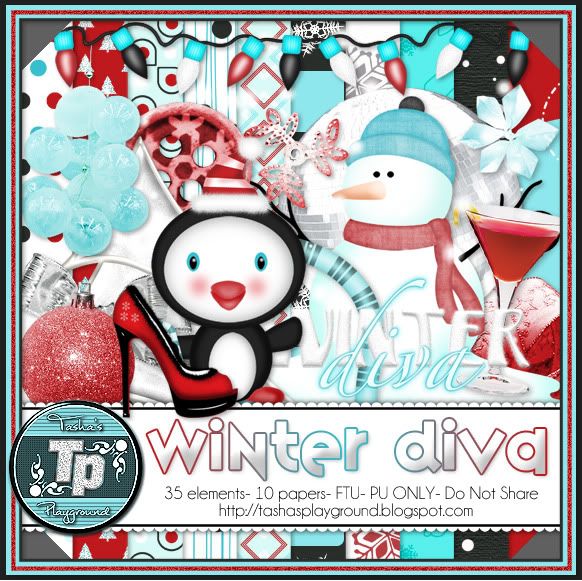
Stop by Amy & Leah's Gimptastic Tuts here to snatch up their parts. Don't forget to thank them for their awesomeness!!!!


Subscribe to:
Posts
(Atom)
My Blinkies



I Get Creative For